

Limitations
Last updated on 2026-01-14 | Edit this page
Estimated time: 10 minutes
Overview
Questions
- What are the limitations of
venv? - What are the limitations of virtual environments more generally?
Objectives
- Understand the limitations of using
venvand some alternatives - Understand the inherent limitations of virtual environments, and potential solutions for them
Specific limitations of venv
While venv is a relatively simple option for setting up
and managing your virtual environments it does have some key
limitations:
- Python version management
- Automatically keeping track of installed packages
1. Python version management
There are differences between the different versions of Python. With the most extreme example being the incompatibility between Python 2 and Python 3. Depending on the complexity of your code, changes between version may not affect you, but it can be hard to tell without trying a newer version. If you want to make your code truly reproducible you should include some information about which version of Python you used to produce your results.
venv uses whichever version(s) of Python you have
installed on your machine, but neither venv or
pip records information about which version of Python you
are using.
It is, of course, possible to include this information with the instructions on how to run your code, but as highlighted multiple times it is better to have an automated solution.
2. Automatically keeping track of installed packages
As shown, using venv with pip can create a
list of dependencies for your project, but this has to be created
manually and updated manually whenever you modify the dependencies for
your project.
Ideally this would be updated automatically as packages are added and removed, so as to avoid any mistakes or forgetting to update it after changes have been made.
Solutions
There are quite a few different tools that have been developed to
deal with these issues. Out of these the ones available, I have found
most useful to be uv and conda/ miniforge/
pixi.
These tools combine package, environment, and Python version
management, allowing you to do everything that pip and
venv do, while also being able to easily switch between
different Python versions. Both will also record the version of Python
used within an environment allowing you to capture both the ‘package’
and ‘language’ layers of your computational environment in one go.
There are some differences between them though:
uv:
- Built as a replacement for pip and
venv
- Uses the same package repositories as pip
- Uses the same virtual environment structure as venv
- Auto updating of environment dependencies file (equivalent to
requirements.txt)
- Noticeably faster for installing packages than pip or
conda
- Not reached a version 1 release (yet!)
conda/miniforge/pixi:
- Provide pre-compiled binaries for packages, which means faster
installation
- Includes other languages (notably R)
- They use their own package repositories, so may not be inter-operable
with other Python tools without a bit of fiddling
- They use their own virtual environment structure that is different
from the one explained here
For a broader discussion of the tooling available for Python version/package/environment management have a look at these two blog posts:
Python Environment Jungle: Finding My Perfect Workflow
An unbiased evaluation of environment management and packaging tools
James Thomas has tutorials
for both uv and pixi
Prior to 2025 I primarily used either pip and
venv or conda to manage my Python
environments. However, for all new Python projects since the start of
2025 I have used uv and will continue to do so wherever
possible. I haven’t used pixi at all.
Once you feel comfortable with the concepts discussed in this
material I would suggest giving uv a try, although
ultimately the best tool for this is the one that suits your workflow
best.
General limitations of virtual environments
Beyond the specific limitations of venv, virtual
environments in general have one key limitation:
- They are not able to control the underlying system they are working within.
If we go back to our diagram showing the different layers of your computational environment, you can see that virtual environments only address the layer of the environment immediately below your code.
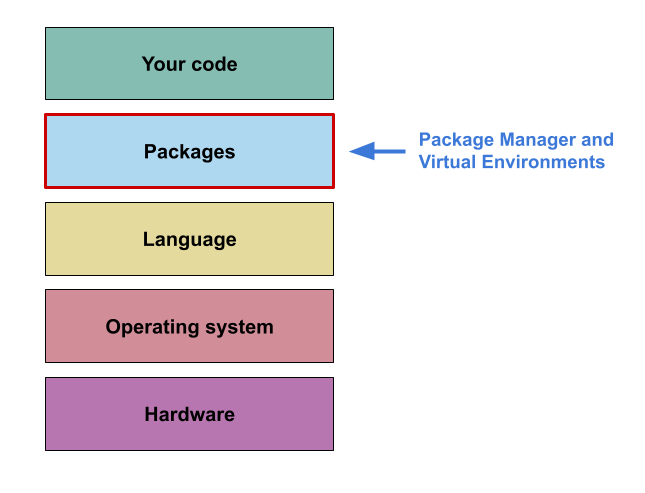
If you are using something like conda,
miniforge or uv, then you may be able to
extend that to the ‘language’ layer. But these tools are not able to
capture the ‘operating system’ layer.
Depending on the degree of computational reproducibility you are looking for, capturing the ‘package’ and ‘language’ layers may be enough. However, if you are looking for byte-for-byte reproducibility you will likely also want to capture as much of the computational environment as possible, and so you will need to turn to other tools.
Capturing the operating system layer
There are multiple different tools that can be used to capture the layer below ‘package’/ ‘language’
Virtual machines
This is one of the more commonly known tools for capturing and
replicating the ‘Operating System’ layer a computational environment.
Virtual machines (VMs) are effectively an emulation or virtualisation of
an operating within your own “host” operating system. For example, using
a virtual machine I can create and run a Windows XP operating system
within my Windows 10 machine. These can also be interacted with using
familiar point and click interfaces, and can be customised to access a
specific portion of the host machines CPU, memory, disk, etc.
It is possible to take a snapshot of an exiting VM for distribution, or
use an ‘Infrastructure
as code’ tool such as Ansible to
write a script to (re)create a specific environment (e.g. install
specific software, etc)
Containers
Containers are similar to Virtual machines in that they virtualise an
operating system, but containers are typically more lightweight than VMs
as they only contain software and files that are explicitly defined in
order to run the project contained within them.
They also typically don’t have a GUI in the same way the OS on your
computer does (although some containers will provide an interface,
e.g. RStudio Server).
If you want to create an environment on your machine and then run it on
something more powerful (like a HPC) then containers are a good way of
achieving this, although this can become complex due to limited
permissions and/or underlying hardware.
Andy Turner of the EPCC has an excellent course providing an introduction to using containers for reproducible computational environments.
Nix/Guix
Nix(OS) and Guix also provide a way of capturing the
computational environment below the ‘packages’ and ‘language’ layers,
but take a slightly different approach to this than VMs and
Containers.
These are package managers based on the idea declarative configurations,
that is: “specify your setup with a programmable configuration file, and
then let the package manager arrange for the software available on the
system to reflect that”.
This is similar to what pip is doing with the
requirements.txt file described previously, but for an
entire Operating system. However, this approach takes it one step
further by allowing multiple versions of the same package to exist on a
machine simultaneously.
For a more complete outline of this approach see this post
-
pipandvenvprovide the most basic functionality for capturing this level of your computational environment. - Other tools (e.g.
uv,pixi) are available that build on this basic functionality that would be worth investigating and incorporating. - Virtual environments can only capture a portion of the computational environment.
- Projects that require more of the computational environment to be captured may need more advanced tools (e.g. VMs, containers, Nix/Guix) to achieve this.